Posts

Showing posts with the label Instagram

Here’s How One Can Restore Recently Deleted Instagram Post
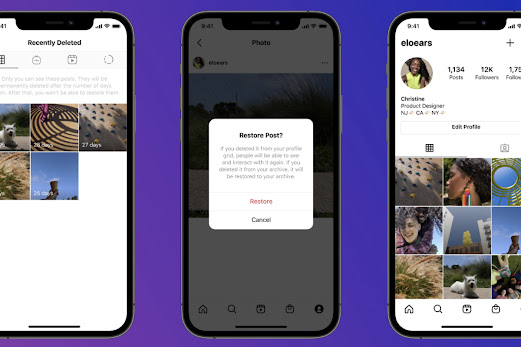
Image
  Have you accidentally lost or deleted any of your Instagram posts? Want to restore it? Along with other social networking apps like Facebook, Twitter, or WhatsApp, Instagram is also one of the most popular and commonly used social media platforms. This social media app is accessed by millions of users all over the world. It is a Facebook-owned platform that offers a lot of great features to all of its users. Accessing Instagram on any device is pretty straightforward and simple. The platform keeps introducing new features for its users. In the year 2020, Instagram has added many great options for the users that include the watch together feature, disappearing messages, selfie stickers along with custom emojis, chat personalization, and much more than that. And now, this social networking service has come up with another new feature that any of its users can easily utilize. Are you also a user of this social media platform? Do you want to know how you can restore any of your delet...

Here’s How You Can Message a Facebook Friend from Instagram

Image
  It was in the year 2012 when Facebook acquired Instagram. Even then also both the platforms remained mostly separated. Since then, Facebook has launched a lot of unique features to offer to its users. And now, this platform has taken another significant step to improve its users’ experience. Recently, Facebook has announced the merge of both of its messaging services. Yes, now, the service has launched a Cross-App Messaging feature for its users. With this feature, the users can now perform cross-platform messaging, which means that they can message their Facebook friends from the Instagram messenger. Have you checked out this feature yet? Want to know about it? Facebook is one of the most popular and favorite social networking platforms among millions of users. And this is obvious because of the features that it has offered to its users. With this change, now the platform has provided more accessibility to all of its users. The Cross-App Messaging feature works in both directi...

How to Control Your Instagram Visibility

Image
Instagram provides the option to their users to control their Instagram visibility when someone searches them using their name. In case you do not go through this procedure, then your Instagram account will be visible to everyone such as your photos, videos, and username. Here’s how to control your Instagram visibility. How to Make Instagram Account Private? •    Launch the Instagram application. •    Go to the profile on the Instagram account. •    Press on the Settings symbol. •    If you are using the iPhone, then the settings symbol resembles a black outlined cog given in the upper right-hand side of the application. •    In case you are using Android, then the settings symbol resembles three vertical dots given on the right-hand side of the Instagram application. •    Enable the “Private Account” option in the Instagram account. You will get the enable button below the ...